1. Choose two photos
Select your earlier photo for the left and your later photo for the right. Photos taken from a similar angle, in similar lighting and at the same camera distance are easier to compare.
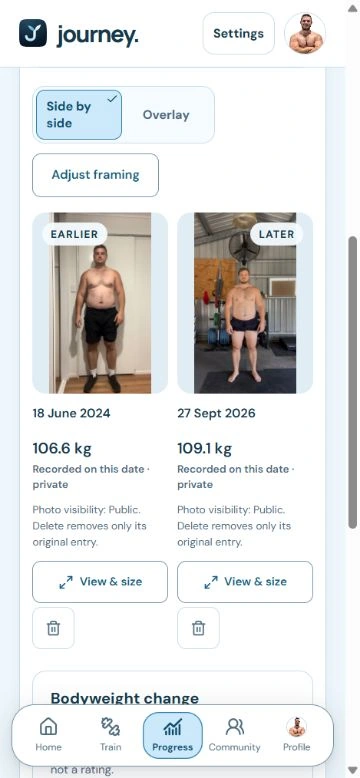
See two moments together, whether you’re tracking weight loss, weight gain or maintaining. Compare your photos free in your browser, at your own pace.
No sign-up to compare. Create a free account to save your comparison as a JPEG.
The app preview shows founder Shannon’s own journal photos and recorded weights. Try the separate free comparison tool below with your own photos. Personal records are not a promise of fitness results.
Free to compare · no sign-up
Choose an earlier photo for the left and a later photo for the right. Adjust each one, then compare side by side or with the reveal slider. A free account is required to save your JPEG.
For a clearer comparison, choose photos with a similar angle, lighting and camera distance.
Photos chosen here stay in your browser. They aren’t uploaded.
Adjusting: Earlier photo (left)
Choose a photo, then drag or pinch to align it.
Free account required to save
Choose an earlier photo for the left and a later photo for the right.
Select your earlier photo for the left and your later photo for the right. Photos taken from a similar angle, in similar lighting and at the same camera distance are easier to compare.
Select either photo to zoom, pan or straighten it independently. Line up a shared reference point, then switch between side-by-side and reveal views.
Compare for free without signing up. When you want to save a JPEG, create a free Journey account or log in to your active account. Your chosen photos aren’t uploaded.
Put an earlier and a later photo side by side to look back on your weight loss journey. Keep the angle and framing consistent so differences in pose or lighting are easier to recognise.
Put weight gain progress into context with photos from two dates. Adjust each image to a similar scale and use the reveal slider to move between your earlier and later photos.
You don’t need a visible change to keep a record. Compare moments while maintaining your weight or simply looking back. Photos show a moment in time; the tool does not calculate bodyweight or body measurements.
With a free account, save a check-in date and choose an angle, or keep a simple selfie. Add a dated weigh-in to keep your photos and recorded bodyweight together.
In your journal, choose two dates and the same angle. Compare the photos alongside your recorded bodyweight and its change in kg and %. These figures come from your weigh-ins, not from analysing the photos.
Private by default
A body photo is personal. Your journal starts private, and sharing is always your choice.
Only the check-ins you choose to share appear to signed-in members.
Make your shared posts private again. Copies shared outside Journey cannot be recalled.
Export your records or delete your account in Settings.
Try the visibility preview

Small steps. A little stronger today.
Only youThis example stays in your private journal.
An illustrative preview only. No account settings change, and nothing is posted or saved. Photos shared outside Journey cannot be recalled.
Your journal starts private. Take the first step when you’re ready.